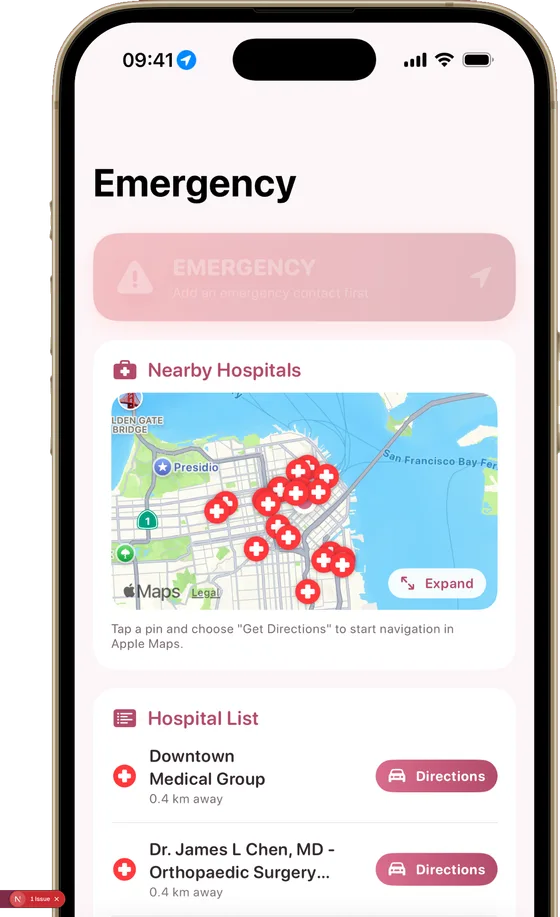
Emergency screen
Two taps away when it matters most
Labor starting, a moment of panic, a night far from home — the Momly emergency screen keeps the essentials in one place: nearby hospitals on a map, one-tap directions, one-tap calling, and sharing your location with the people you trust.
Momly is not an emergency service. In a real emergency, always call your local emergency number or go to the nearest healthcare facility first.
How it works
Open it in one move
The Emergency tab is always one tap away in the app — and if you add it to your iPhone Lock Screen, you can reach it without even unlocking your phone.
See the nearest help
A live map shows the hospitals around you. Tap a pin and turn-by-turn navigation starts immediately in Apple Maps.
Call or share with one tap
One button calls emergency services directly. Another sends your live location to the person you chose in advance and calls them — always with your confirmation, never automatically.
Why it matters
In a real emergency, seconds are spent searching: which hospital is closest, what was the number, how do I describe where I am? This screen removes all three questions. You set it up once — add your emergency contact, place it on your Lock Screen — and hopefully never need it. If you do, everything is already where your thumb expects it.
Nearby hospitals on a map
See the hospitals around you on a live map and start navigation with a single tap on a pin.
Call emergency services in one tap
A dedicated button dials emergency services directly — no searching through contacts under stress.
Share your location with loved ones
Send your live location to the person you choose and call them — with your confirmation, never automatically.
On your Lock Screen too
Add the emergency screen to your iPhone Lock Screen and reach it without even unlocking your phone.
Never behind a paywall
The emergency screen stays accessible to everyone, always — no subscription required.
Your location is not stored
Location is used only to show nearby hospitals and to share where you are when you choose to. It is never saved or sent anywhere else.
Set it up before you need it
Download Momly, add your emergency contact and put the screen on your Lock Screen — so it is ready long before the big day.